
There is usually a specific moment when cash basis stops working. Perhaps it’s when a lender asks for two years of statements and wants to know why December looks like a blowout and January looks like a funeral. Or maybe a prospective buyer asks what your actual gross margin is by month. Or you sign a $60,000 annual contract, collect it all in one wire, and your P&L declares you the most profitable business in your zip code for exactly thirty days. Cash basis is not wrong in any of those situations, it’s just answering a different question than the one being asked.
The concept of accrual accounting is not the hard part. Most operators can explain the difference between earning revenue and collecting it in about fifteen seconds. The hard part is the maintenance: the schedules, the recurring entries, the month-end discipline that keeps prepaid balances from calcifying on the balance sheet forever. That is where a do-it-yourself conversion usually dies, and it is where the choice of system matters far more than the choice of textbook. Today we’ll look at How To Do Accrual Accounting Without An Accountant.
The Bottom Line Up Front
Converting to accrual is a one-time balance sheet exercise you can absolutely do yourself. Staying on accrual is a recurring schedule-maintenance problem, and that is the part to automate rather than white-knuckle. Get the conversion entries right, keep the number of manual schedules small, and pick a platform that maintains accrual mechanics natively instead of one that only reports on an accrual basis.
Accrual Is Four Mechanics With One Concept

Strip away the terminology and accrual asks you to answer two questions on every transaction: when was this earned or incurred, and when did the cash show up? When those two answers differ, a balance sheet account absorbs the gap. There are only a handful of those accounts, and they do almost all of the work. It’s really not as complicated as one may think.
- Accounts receivable (AR): Earned, not yet collected
- Accounts payable and accrued liabilities (AP): Incurred, not yet paid
- Prepaid expenses: Paid, not yet utilized
- Deferred revenue: Collected, not yet earned
- Fixed assets and accumulated depreciation: Paid once, consumed over years
If you can keep those five categories honest month to month, you are running legitimate accrual accounting. Everything else is refinement.
Two of these are largely automatic in any real accounting system. If you invoice customers and enter vendor bills, AR and AP maintain themselves as a byproduct of normal workflow. The other three are the ones that require you to remember something in a future period that nobody will remind you about, and they are the reason people hire accountants.
How to Convert to Accrual Accounting One Time: Build a Balance Sheet

Pick a conversion date. The first day of a fiscal year is by far the cleanest, because it avoids a hybrid year that no one can explain later. Then take an inventory as of the day before:
- Work performed but not yet invoiced, and invoices issued but not collected
- Vendor bills received but unpaid, plus expenses incurred with no bill yet (utilities, contractor hours, accrued payroll)
- Amounts paid in advance for things like insurance, annual software, prepaid rent, prepaid taxes
- Customer deposits and retainers you have not earned
- Equipment on the books at cost, with depreciation calculated from the in-service date
Each of these becomes an entry establishing the balance sheet account. The critical rule is where the offset goes: to retained earnings, or a clearly labeled transition equity account — never to current-year revenue or expense. Those balances represent activity from prior periods. Running them through this year’s P&L destroys the comparability you converted in order to get.
Also understand that you have just changed your book method. Your tax method is a separate decision, and is unchanged. Most small businesses in the U.S. remain eligible for the cash method for tax purposes; as long as the gross receipts threshold sits under an average of $32 million per year. Plenty of businesses run accrual books for management and lender reporting while continuing to file on cash to defer tax. If you do decide to change the tax method, this is one of the few places in this process where an hour with a CPA is money well spent.
Where and Why Manual Work Breaks Down

Here is the part that gets glossed over in most explainers. The individual entries are trivial. The schedules however, are not.
A $12,000 annual insurance policy is not one journal entry, it’s twelve, each posted in a different month, each one a chance to forget. Thirty active customer contracts on annual terms is 360 revenue recognition entries a year, each at a different point in its own twelve-month arc. Add a handful of fixed assets on varying useful lives and a few accrued expenses that reverse and re-accrue monthly, and you are running a parallel spreadsheet system that has become the actual source of truth for your financial statements. And let me put it as about as bluntly as it can be put: if it is all done in Excel, the financials are wrong half the time just because it’s human nature to forget or ignore something we don’t want to do.
Can Software Help?
The platforms most people already own do less about this than they appear to. In both QuickBooks Online and Xero, the cash/accrual selector on reports is a reporting filter, not a ledger conversion. It presents the transactions you already entered on a different basis. It will accrue an unpaid bill you recorded; it will not calculate deferred revenue, amortize a prepaid, or accrue unbilled payroll, because you never told it those things exist.
Also, QBO has a specific issue worth knowing before you build a workflow around it: manual journal entries hit both cash-basis and accrual-basis reports. Post a clean deferral entry moving revenue from December to January, touching no cash account at all, and your cash-basis reports change too. Xero users have been requesting native prepayment and deferral schedules on the company’s own product ideas board for years, with the recurring theme being that everyone maintains spreadsheets to compensate.
Recurring journal entries can help close part of the gap. They work well for fixed, predictable amounts like a flat, monthly prepaid amortization or straight-line depreciation on a single asset. They handle variable accruals poorly, and I find I’m constantly building schedules and workpapers for clients to combat this if the client is on one of these systems. In practice, native recurring entries hold up to roughly ten or fifteen active schedules. Past that, the administrative overhead of managing the automation exceeds the work it saves.
What The Current Field Looks Like For Accrual Basis

The entry-level tier of accounting platforms like Wave, FreshBooks, Zoho Books on its lower plans will produce a report on an accrual basis and let you post journal entries. That is the whole feature set, after that it gets thin. If your accrual needs amount to AR, AP, and one insurance policy, that is sufficient, and there is no reason to pay for more. Zoho Books scales better than the others as complexity grows, but its cheapest tier expects you to write journal entries by hand.
QuickBooks Online remains the default in the U.S. for one unglamorous reason: every accountant, bookkeeper, and lender in the country already knows it, and in my opinion that’s a weak reason to stick with it. Its Advanced tier adds basic deferred revenue scheduling, and a small ecosystem of bolt-on tools exists specifically to automate prepaid and accrual schedules inside QBO. If you have any expectation of handing the file to a CPA later, or you operate in inventory, construction, or another domain with real job-level complexity, staying in the QBO ecosystem and adding an accrual automation layer is an okay path, but there are better built tools.
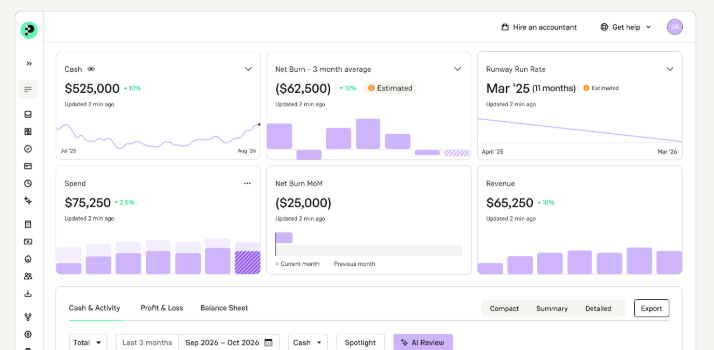
The more interesting development for an operator is the AI-native ledger, where accrual mechanics are part of the foundation rather than a reporting toggle. Puzzle.io is the clearest current example: it maintains cash and accrual views from a single general ledger simultaneously, so you can watch runway on a cash view while producing GAAP-basis statements for a lender or investor without keeping two sets of books. Rather than writing categorization rules, you define accounting policies such as capitalization thresholds, useful lives, and recognition methods and the system drafts the resulting schedules and journal entries continuously from connected sources like Stripe, Ramp, Mercury, and Gusto. Nothing posts without approval, which is the right design; you are reviewing drafted work instead of originating it.
Actually Close The Books

Whichever system you land on, accrual accounting is a monthly rhythm, not a setting. Block ninety minutes on the first business day after month end and work a fixed list:
- Reconcile every bank, card, and payment processor account
- Post or approve the month’s prepaid amortization and revenue recognition
- Accrue known-but-unbilled expenses; verify last month’s reversals actually reversed
- Record depreciation
- Tie every balance sheet account to a supporting schedule
- Review the P&L against the prior month and ask about anything that moved more than 10%
In my experience, the last two matter most. Accrual books fail after a prepaid balance stops moving, or a deferred revenue account creeps upward forever, and the balance sheet tie-out is the control that catches it. Write your policies down on a single page while you are at it: capitalization threshold, recognition method, the dollar floor below which you will not bother accruing. That page is what makes your statements defensible to anyone who asks, and it is what a reviewer will ask for first.
My Bottom Line

You do not need an accountant to convert to accrual. You need a clean conversion date, correct opening entries offset to equity, and a close process you will actually run. What you should not do is take on unpaid schedule maintenance as a permanent job. That is the part that burns out founders, and leads to frustration.
So choose the system based on how much of that recurring work it will carry for you. If your accruals are simple, your existing software plus a disciplined recurring entry or two is plenty. If you are tracking a dozen contracts and prepaid items across spreadsheets, a platform that maintains those schedules natively will pay for itself in accuracy before it pays for itself in time. Either way, keep a CPA in your contacts for the first audit, the tax forms, and the year-end review. A reviewer is a much cheaper role than a preparer, and it is a role that only works if the books were built right in the first place.